简介
这是我在伦敦大学学院研究生阶段的团队项目,与微软和伦敦GOSH医院合作完成,在最终交付产品包括一个云原生分布式结构平台以及HoloLens应用,可以将CT、MRI等医疗图像转化成3D全息图像,在HoloLens中进行观察和操控。
我在这个项目中主要负责HoloLens应用以及Unity Asset package的开发,此外我编写了我们的项目网站。系列的文章一共有6篇,分别介绍项目中几个核心组成部分,这里将直接引用项目网站中的英语简介,不进行翻译。
Background
Recent technical advancements in the realm of augmented reality (AR) and the availability of consumer head-mounted display (HMD) devices such as the Microsoft HoloLens have opened a wealth of opportunities for healthcare applications, particularly in medical imaging. Several approaches have been proposed to transform imaging studies, such as CT or MRI scans, into three-dimensional models which can be inspected and manipulated in an AR experience. Generally, all studies agree that the technology is very promising and may even revolutionise the practice of medicine. However, virtually every existing workflow relies on significant manual guidance to conduct steps like segmentation or conversion to polygonal models.
Neural networks can help automate many tedious tasks and are increasingly used in medical imaging. Architectures such as the 3D U-Net generate models which autonomously create segmentation maps, even with relatively little training data. However, translating these advancements from theory to clinical practice has unique challenges: The source code may not be available, documentation may be missing or require too much technical knowledge. Furthermore, different operating systems, software packages and dependencies obstruct successful usage.
With the HoloRepository project, we intend to build the technical base for a seamless workflow that allows practitioners to generate 3D models from imaging studies and access them in an AR setting with as little manual involvement as possible. Pre-trained neural networks can be packaged into shareable Docker containers and accessed with a unified interface. Additionally, the Fast Healthcare Interoperability Resources (FHIR) standard, which is rapidly being adapted and also has a significant impact on the field of radiology, will connect the 3D models with existing patient health records.
System overview
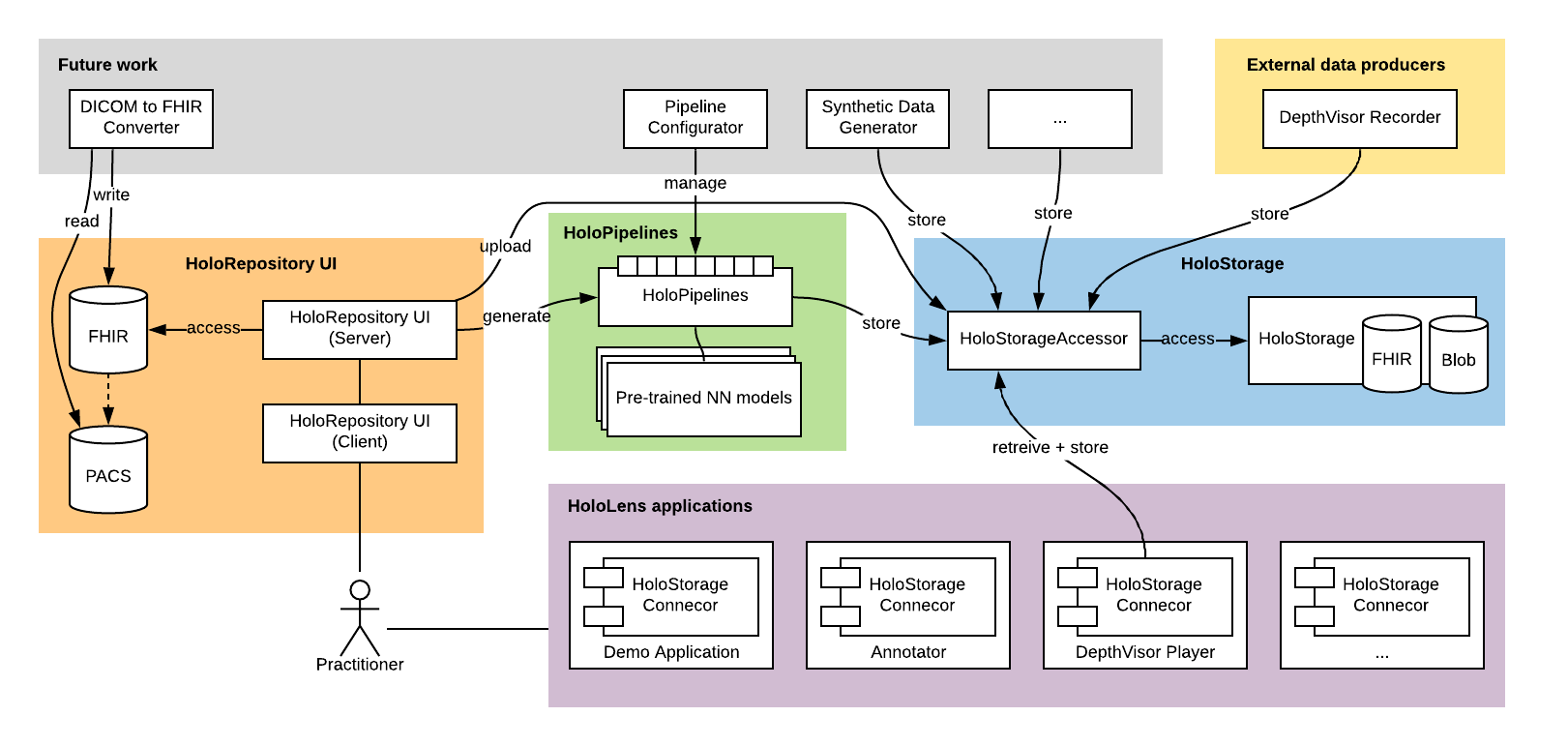
The HoloRepository ecosystem consists of multiple sub-systems and remains open to future extensions. Currently, core components are:
HoloRepositoryUI 

A web-based application that allows practitioners to browse their patients and manage the generation of 3D models sourced from imaging studies like CT or MRI scans. The client-side application is accompanied by an API server that is responsible for communicating with the other components.
HoloPipelines 

A cloud-based service that performs the automatic generation of 3D models from 2D image stacks. Pre-trained neural network models are deployed and accessed with this component alongside traditional techniques like Hounsfield value thresholding.
HoloStorage
A cloud-based storage for medical 3D models and associated metadata. Entirely hosted on Microsoft Azure, a FHIR server stores the structured medical data and a Blob Storage server provides for the binary holographic data.
HoloStorageAccessor 
An enhanced facade, offering a consistent interface to the HoloStorage and translating the public REST API to internal FHIR queries. To facilitate development of 3rd party components, the interface comes with an interactive OpenAPI documentation.
HoloStorageConnector
A Unity library handling the runtime network connections from HoloLens applications to the HoloStorage. Distributed as a separate UnityPackage, this is meant to facilitate development of 3rd party applications that plug into the HoloRepository ecosystem.
HoloRepository demo application
A simple application that demonstrates how to dynamically access 3D models stored in the HoloStorage. The scenes can be distributed alongside the Connector library and serve as examples and interactive documentation.
Other tools
Several scripts and tools were developed to help perform tasks, for instance test data generation or deployment automation.
Integration with other projects
The system is designed to enable other systems to integrate. Some current projects plugging into the system are DepthVisor, Annotator and SyntheticDataGenerator.
Code organisation
Most of the components are kept here in the HoloRepository-Core mono-repository. The sub-directories correspond to sub-components as described above. The only exception are the components that are developed in Unity/C#, they are separately kept in the HoloRepository-HoloLens repository.
Development
Get started
To get started, you should clone both relevant git repositories:
 $ git clone git@github.com:nbckr/HoloRepository-Core.git
 $ git clone git@github.com:nbckr/HoloRepository-HoloLens.git
Next, it is highly recommended to expolore the READMEs that are provided for each component.
Set up the environment
The different components are developed in different languages and making use of different tools, so your next step should be inspecting the README in the respective directory.
Pre-commit hooks
As some languages, like Python, are used for multiple components, we use a common tool to enforce coherent coding style. The code formatter black is checking new commits via a pre-commit hook. Steps to set it up:
- Install developer dependencies with
pipenv install --devorpip install -r requirements-dev.txtin the project root directory - Setup pre-commit hooks with
pre-commit install
For the TypeScript portions, similar tooling is used. To set it up, follow the instructions in the respective sub-directories.
CodeFactor
CodeFactor is another tool we use to ensure high code quality. It will run automatically on GitHub for any activated branches, as well as for all pull requests. If the service finds any issues, please fix them before we will continue to consider the pull request.
Note: The tslint.json config is solely for this purpose. The actual JavaScript / TypeScript code is linted with ESLint, given that TSLint will be deprecated. Use the TSLint config only when CodeFactor’s default rules are unreasonable.
System integration
Ports and interfaces
The different components are meant to be deployed independently. They communicate via REST APIs, which are documented in the sub-directories’ READMEs. For development, the system can be run on the same host, using these default ports:
 HoloRepositoryUI/client:  3000
 HoloRepositoryUI/server:  3001
 HoloPipelines/core:       3100
 HoloStorageAccessor:      3200
 HoloPipelines/models:     5000, 5001, 5002, ...
Run system in docker-compose
As the system comprises multiple separate components, it can be helpful to use docker-compose to locally start all of them at once, for instance to perform integration tests or develop a new component.
Note: To successfully start the Accessor, you need to provide the relevant configuration in ./HoloStorageAccessor/config.env (see the sub-component’s README for more information).
This will also reflect the current state of the sub-components’ Dockerfiles. To build and start all images (if they haven’t been build already), run:
 $ docker-compose --file docker-compose.dev.yml up
 Starting holorepository-core_holorepository-ui-client_1                      ... done
 Starting holorepository-core_holopipelines-models__dense_vnet_abdominal_ct_1 ... done
 Starting holorepository-core_holorepository-ui-server_1                      ... done
 Creating holorepository-core_holostorage-accessor_1                          ... done
Force a rebuild by replacing docker-compose up with docker-compose build.
You can also just run a single component or a selection of components, but still use the provided configurations, port mappings etc. from the docker-compose file for convenience:
$ docker-compose --file docker-compose.dev.yml up holostorage-accessor holorepository-ui-server
Lastly, it is also possible to start the whole system except for one component, which will allow you to develop this component and, for instance, manually run it in dev mode.
$ docker-compose --file docker-compose.dev.yml up --scale holostorage-accessor=0
Acknowledgements
Built at University College London in cooperation with Microsoft and GOSH DRIVE.
Academic supervision: Prof. Dean Mohamedally, Prof. Neil Sebire