HoloPipelines 
A cloud-based service that performs the automatic generation of 3D models from 2D image stacks. Pre-trained neural network models are deployed and accessed with this component alongside traditional techniques like Hounsfield value thresholding.
Description
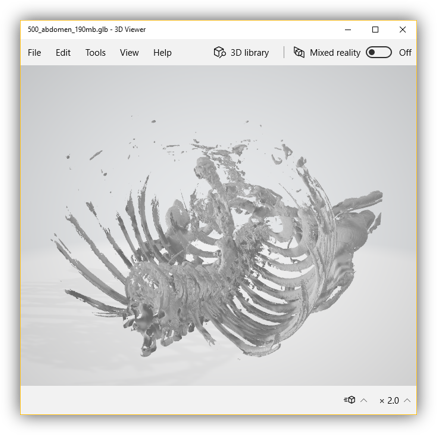 The HoloPipelines are responsible for the generation of 3D holograms to eventually be displayed in the HoloLens, sourced from DICOM imaging studies. The cloud-hosted service provides a consistent pipeline interface to consume DICOM and yield glTF2 files (plus associated patient data). By implementing a Docker-based template, arbitrary pre-trained neural network (NN) models can be plugged into the HoloPipelines service seamlessly. This allows to add new workflows in the future and implement each workflow independently.
A typical pipeline will process the data fully automatic by utilising a NN model which has been trained to perform a specific task, such as segmenting the bones from a CT scan. Several Docker-based interfaces for distributing pre-trained models have been suggested, for instance the ModelHub.ai scheme, Niftinet or Microsoft Azure ML. We will iteratively add adapters for these interfaces, so that the HoloPipelines can integrate existing models.
As each pipeline is independent, semi-automated or manual pipelines (which may even include their own front-ends or manual processing steps) could be added later.
Upon receiving a DICOM image series, a job will be started and passed through the different stages of a pipeline. The status of each job can be queried through a distinct API. When finished, the result will be handed on to the HoloStorage Accessor.
Technologies
Majority of the code is written in Python 3.7.3
- Web application framework to handle requests Flask
- Node.js to utilise the package available for glTF conversion and transformation
- An open source convolutional neural networks platform NiftyNet
- Pipelines containerized using Docker
- Testing is done through Pytest
Architecture
The HoloPipelines themselves are a cloud-based application developed with Python. The code implements a Pipes-and-Filters pattern and is kept modular. Different modules can be pieced together to reflect different workflows, and thereby provide different pipelines.
The modules that form a pipeline can perform different tasks:
- The first module in the chain is responsible for listening to incoming
POSTrequests and then actively pulling the input data from the PACS. - Intermediate modules perform various pre- or post-processing tasks such as rescaling, cropping, or filtering.
- Special adapter modules are used to call the pre-trained NN models, which are being deployed as separate containers and accessed via HTTP calls.
- The last module is responsible for sending the result off to the HoloStorage Accessor.
Pre-trained NN models
We are continually wrapping existing pre-trained models with a lightweight Flask API and a Dockerfile. These models can be found in the models/ directory.
If you want to train your own model or integrate an existing model that is not officially supported yet, you can easily integrate it yourself. You will need to implement some kind of server to comply with the specified API endpoints (documented in models/README.md) and a Dockerfile. You can take a look at the existing models for reference.
Development
Requirements:
Python 3.7 or above
Dependencies and installation:
Dependencies can be installed by using pip command as follow
pip install -r requirements.txt
Some dependencies are not available through pip, they are listed below with their installation instructions
These 2 dependencies can be installed using Node.js package manager. Please make sure to have the latest version of npm installed.
npm install -g obj2gltf
npm install -g gltf-pipeline
Local usage
 usage: pipelineController.py [-h] [-c CONFIG] [-l] [-i NAME]
                              [-p [PARAM [PARAM ...]]]
                              [pipelineID]

 Select pipeline to process

 positional arguments:
   pipelineID            ID of pipeline

 optional arguments:
   -h, --help            show this help message and exit
   -c CONFIG, --config CONFIG
                         path to pipeline config file relative to
                         pipelineController
   -l, --ls              list all the available pipelines
   -i NAME, --info NAME  get info from pipeline's name
   -p [PARAM [PARAM ...]], --param [PARAM [PARAM ...]]
                         parameters for pipeline e.g. dicom folder name or HU
                         threshold
Example usage
python pipelineController.py p4 -p 3_Axial_CE
p4: pipeline ID. In this case to segment lung and generate glb from it-p 3_Axial_CE: param(s) for the specific pipeline, in this case a directory for an upper ct scan from medicalScans/dicom
Testing
Testing is done using pytest:
 pip install pytest
 pip install pytest-cov
Execute tests by running the following command in HoloPipelines directory:
pytest --cov
Note: Tests downloads sample files during the testing process. These files can be deleted by running cleanUp.py
API specification
GET /pipelineapp
To get a list of all available pipelines
GET /job/<jobid>/status
To get the status of a job with specific ID
POST /job
To start a job
POST /status
To update status of a job
Contact and support
This component is owned by Pap and Kawai. Please get in touch if you have any questions. For change requests and bug reports, please open a new issue.